How Does the DNS Service Actually Work
When we visit web pages like www.baidu.com, the DNS server is like a black box:
we input an address and it returns the IP corresponding to that address. Then we access the other side’s server via the IP
(if you don’t know why an IP is needed to access it, please brush up on computer networking knowledge — and don’t bother
reading on below). This is what the caching DNS server closest to us does.
The function looks simple, but its internal implementation is not at all that easy. This DNS server is very “busy”.
Suppose Our Computer Is Now a DNS Server
And currently we have no cached information about any website. A user requests a domain like www.163.com — what should we do?
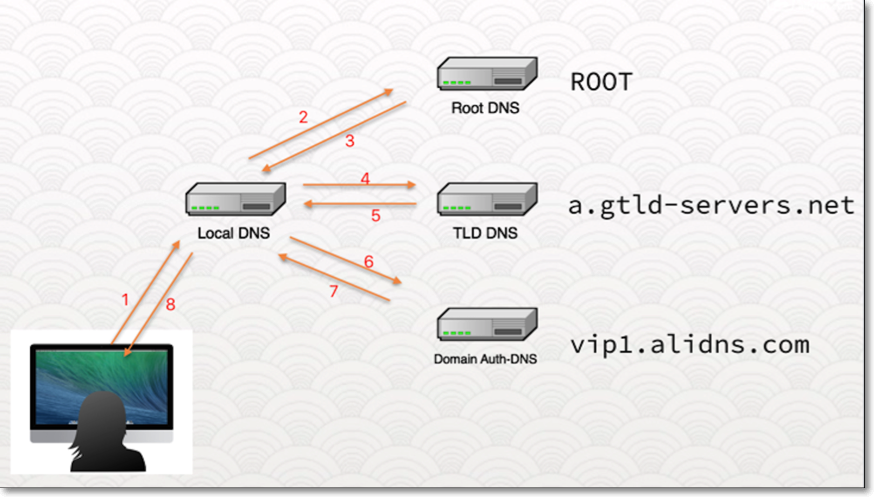 This is a picture from Authoritative DNS and Recursive DNS. What we now need to do is similar to the actions of the
 Local DNS
server.
The rough process is: we first query the Root DNS server; Root DNS returns the address of the TLD DNS;
we keep querying, and finally get the result from the Domain Auth-DNS.
We must first obtain the address of the Root DNS and send it a query. The Root DNS
addresses don’t come from nowhere — they come from named.root.

Then we can use the simple little tool dig to query DNS servers; @ specifies the DNS server used for this query.

The picture has no ANSWER SECTION, but it has an AUTHORITY SECTION. The meaning of this response is:
I, Root DNS, don’t know the address corresponding to your domain, but I know the addresses for domains with the com suffix.
You can ask these servers — that is, the results in the AUTHORITY SECTION. But you must have noticed
that entries like e.gtld-servers.net are also domain names whose addresses we don’t yet know.

The good news is that after the AUTHORITY SECTION there is an ADDITIONAL SECTION giving the DNS servers’ addresses,
which we can use to continue querying.

This query also didn’t get the desired result; we obtained another batch of DNS server addresses.
These servers can resolve DNS queries for the 163.com. suffix. We need to keep looking at the ADDITIONAL SECTION.


On the last query we finally got an ANSWER SECTION — but it is a CNAME type, which is also
an address. We need to continue looking up the IP corresponding to this address. Frustrating, isn’t it? This means we have to
walk through the whole process above again to look up the IP of www.163.com.lxdns.com..
Here, if you don’t want to query manually again and again, you can use dig +trace www.163.com.lxdns.com. —
a few more queries and you’ll get the result.

Let me ask you: for a single official website address, the DNS server works this hard — how could it NOT cache?!
How Does a Website Learn Our DNS Server Address
What was described above is the working process of a caching DNS server. What relates to our daily life is sending it an
address like www.163.com and getting the website’s real IP. Because our DNS query comes first
and visiting the website comes after, these two are completely different worlds — a website can by no means learn our
DNS server address.
The training introduced this URL: http://nstool.netease.com/.

Through the nstool web page, you can get the DNS server used by your machine.
So why would a site like nstool exist? Unless… unless the site’s backend also provides DNS resolution service, obtaining our DNS server address before we visit the site, and then simply performing a response operation.
The Working Principle as I Understand It
Seeing a peculiar website, the first thing to do is open F12 as a sign of respect.
 You can see the page embeds an
 iframe, and in the iframe there is a strange URL.
When you request this page, two requests happen:
- First, request
http://nstool.netease.com/and get an HTML page with aniframe. - With the
iframein hand, what you do is send another request — and this request brings back theDNSserver address.
- When did the remote learn the caching DNS server’s address?
The first request is an ordinary HTTP request; the remote cannot learn our DNS server from it. The second request brings back the DNS server address. So it must be between the first request and the second request that the website obtained our DNS server address.
- How exactly did the remote learn the caching DNS server?
I believe you remember the long
http://only-845604-218-107-55-252.nstool.netease.com/above. Honestly, how could any server correspond to such a URL? This is the other key point: from the earlier query process, to access this long URL we must first query the authoritative DNS server corresponding tonstool.netease.com. And this query is made by our own caching DNS server.
And it just so happens that this authoritative DNS server is configured by the company internally. So what it queried and from which IP the query came are then known to the authoritative DNS. You see, this URL is so special —
onlyxxx— store it. The authoritative DNS server then returns the address of some available HTTP server; that HTTP server checks the HOST and IP, matches them, and retrieves the caching DNS server’s IP from just now — and the whole flow ends.

Should We Set Our DNS Server to 8.8.8.8
A Little More Meaning of DNS Servers
For a website, the original goal must be to let more people access it faster. How is this achieved? Add resources to servers — is that enough? Not enough? Will a phone in Beijing accessing a page in Shenzhen be fast? No? What to do? Put servers in Beijing too. This creates a problem: whether in Beijing or Shenzhen, the servers’ IPs differ but the address is the same. If users in both places access the same address and requests are forwarded to their respective servers, the effect is certainly the best.
So how to implement it? Users in the Beijing area use Beijing-area DNS servers; Shenzhen users use Shenzhen servers. For query requests coming from Beijing DNS servers, our DNS server wants to return the Beijing server IP; the same for Shenzhen. This way the DNS server carries part of the traffic-splitting function, and user experience rises at the same time.
Why 8.8.8.8 Is Not Good
This is Google’s DNS server address. Of course it also uses some black magic — you know: if the whole world queried the same DNS server, how huge would that server’s load be. For ISPs, the request is always served by the server behind 8.8.8.8 that is closest to the current request point. Then this 8.8.8.8 DNS server will query the authoritative DNS server — and of course it will have location information too.
But however good it is, there’s one bad point: Google has no servers in China. The 8.8.8.8 you want to access is far abroad. If the website thinks you’re an overseas user and returns an overseas IP, then the user experience is destined to be terrible.
Living in China, just honestly use the default DNS server, or use ISP-provided DNS servers like 114.114.114.114. In this case, the moon abroad is not rounder.
References
First, thanks to this internal NetEase training — I gained a lot.
How DNS works and using dig Authoritative DNS and Recursive DNS